
Last updated on
Oct 31, 2026
KS RF-9 2022-2026 free printable template
pdfFiller is not affiliated with any government organization

Fill out
Complete the form online in a simple drag-and-drop editor.

eSign
Add your legally binding signature or send the form for signing.

Share
Share the form via a link, letting anyone fill it out from any device.

Export
Download, print, email, or move the form to your cloud storage.
Why pdfFiller is the best tool for your documents and forms


End-to-end document management
From editing and signing to collaboration and tracking, pdfFiller has everything you need to get your documents done quickly and efficiently.
Accessible from anywhere
pdfFiller is fully cloud-based. This means you can edit, sign, and share documents from anywhere using your computer, smartphone, or tablet.
Secure and compliant
pdfFiller lets you securely manage documents following global laws like ESIGN, CCPA, and GDPR. It's also HIPAA and SOC 2 compliant.
What is KS RF-9
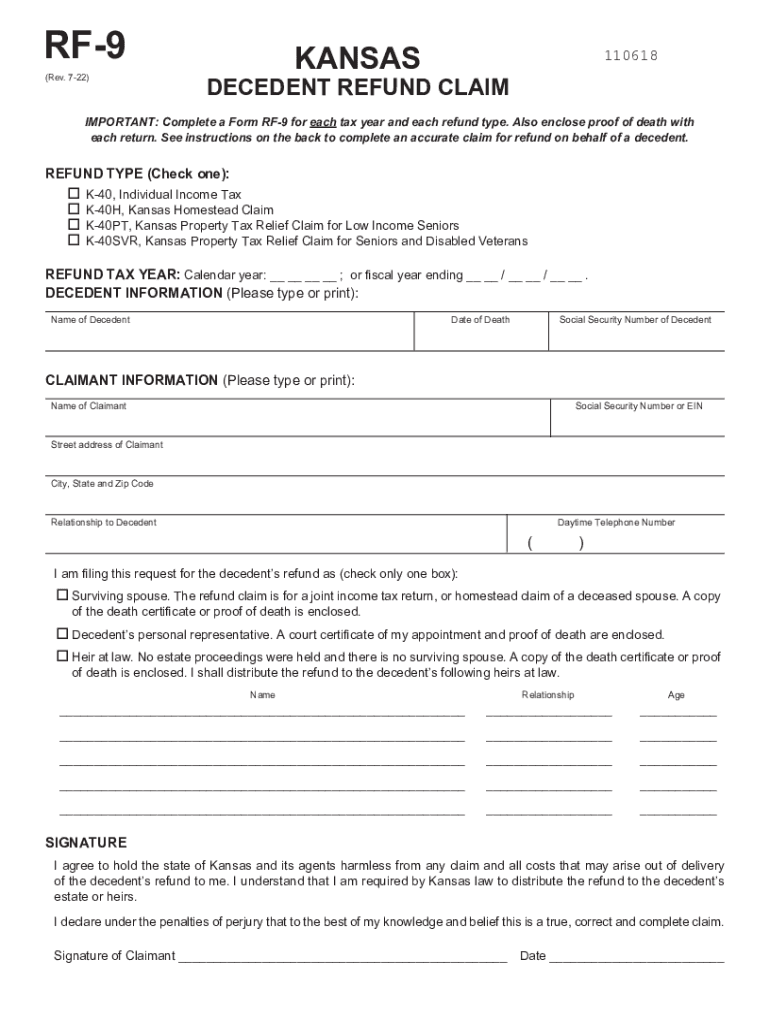
The Kansas Decedent Refund Claim Form RF-9 is a tax document used by claimants to request a refund on behalf of a decedent in Kansas.
pdfFiller scores top ratings on review platforms




I have just used pdfFiller for the…
I have just used pdfFiller for the first time, but it was really quite simple and user-friendly. Thank you!
excellent
excellent service!
been looking for something this simple…
been looking for something this simple for a long time
first time user
brand new, so far ok, time will tell the whole story but so far everything is good to go.
Best Value PDF Software
I am using PDF filler to help sign documents that were sent with Adobe and therefore locked for a countersignature, date or time stamp edits, and changes to PDF documents to fix legal edits.
This software is very easy to use, gets the job done, and is extremely well priced relative to its competitors.
There are no features I dislike, it has honestly been a huge lifesaver at work as I am constantly fixing documents/changing pdf versions.
I like how all apps get filled at the same time.
Who needs KS RF-9?
Explore how professionals across industries use pdfFiller.

KS RF-9 is needed by:
-
Individuals settling a decedent's estate in Kansas
-
Beneficiaries of a deceased person's estate
-
Legal representatives or executors of a decedent's estate
-
Heirs seeking tax refunds for a decedent
-
Tax professionals assisting with estate claims
Comprehensive Guide to KS RF-9
What is the Kansas Decedent Refund Claim Form RF-9?
The Kansas Decedent Refund Claim Form RF-9 is an essential document that enables claimants to request a tax refund on behalf of a deceased individual. This form plays a significant role in Kansas tax procedures, ensuring that beneficiaries or heirs can reclaim any due tax refunds. The claim process requires the submission of precise details regarding the decedent and the claimant’s relationship to the deceased, making it a crucial tool for managing decedent-related tax matters.
By utilizing the Kansas decedent claim form, beneficiaries can navigate the refund process efficiently. Understanding the specific requirements and steps involved in filing this form can significantly enhance the likelihood of a successful claim.
Purpose and Benefits of the Kansas Decedent Refund Claim Form RF-9
The primary purpose of the Kansas Decedent Refund Claim Form RF-9 is to facilitate the refund claims process for decedents. Claiming a refund can alleviate financial burdens for beneficiaries who may be managing the estate of the deceased.
-
Enables heirs to recover funds that would otherwise remain unclaimed.
-
Financial support can assist beneficiaries in settling debts or other estate-related expenses.
-
The form simplifies the administration of tax refunds associated with deceased individuals.
Who Needs the Kansas Decedent Refund Claim Form RF-9?
The RF-9 form is specifically designed for claimants related to the decedent, such as spouses, children, or authorized representatives. Understanding who qualifies is crucial to ensure that the appropriate person submits the claim.
-
Claimants must have a direct relationship to the decedent to file the RF-9.
-
Situations requiring this form include unsettled tax refunds due at the decedent's time of death.
Key Features of the Kansas Decedent Refund Claim Form RF-9
This form contains several key components necessary for accurate submission. The fillable fields require specific information about both the decedent and the claimant.
-
Name of Decedent
-
Date of Death
-
Social Security Number of Decedent
-
Name of Claimant
-
Street address of Claimant
-
Instructions for completing the form
Additionally, the form includes checkboxes to indicate the type of refund sought, guiding users through the completion process.
How to Fill Out the Kansas Decedent Refund Claim Form RF-9 Online (Step-by-Step)
Completing the Kansas RF-9 form online requires careful attention to detail. Follow these steps to ensure accuracy and efficiency in the filling process:
-
Access the form through the pdfFiller platform.
-
Input the name of the decedent and their Social Security Number.
-
Provide your relationship to the decedent and other required information.
-
Review the form for any missing fields or potential errors.
-
Submit the completed form electronically or prepare it for mailing.
Considering these steps can help avoid common errors that may delay the processing of your claim.
Required Documents and Supporting Materials for the Kansas Decedent Refund Claim Form RF-9
Submitting the Kansas Decedent Refund Claim Form RF-9 requires specific supporting documentation to validate the claim. To ensure successful submission, including the following materials is essential:
-
Proof of death, such as a death certificate
-
Documentation verifying the claimant's identity and relationship to the decedent
A checklist can aid claimants in gathering all necessary documentation before submission, reducing the risk of rejection due to incomplete applications.
Submission Methods for the Kansas Decedent Refund Claim Form RF-9
Once the Kansas RF-9 form is completed, claimants can submit it using various methods. Being aware of these options is critical for timely processing of the refund claim.
-
Online submission via pdfFiller for immediate processing
-
Mailing the form to the appropriate tax authority
Each method may have its associated fees and processing times, and claimants should anticipate follow-ups or additional information requests after submission.
What Happens After You Submit the Kansas Decedent Refund Claim Form RF-9?
After submitting the Kansas Decedent Refund Claim Form RF-9, claimants should be prepared for the next steps in the refund process. Knowing how to check the status of the submission can provide valuable updates on the claim's progress.
-
Claimants can often track their application status online through the relevant tax authority's portal.
-
There may be outcomes such as approval or requests for additional documentation to complete the processing.
Using pdfFiller to Complete the Kansas Decedent Refund Claim Form RF-9
pdfFiller offers a robust platform to facilitate filling, signing, and submitting the RF-9 form. This cloud-based editing tool streamlines the process, making it accessible from any device.
-
Features include easy text and image editing.
-
Robust security measures ensure the protection of sensitive information.
-
User-friendly interface simplifies form completion.
By leveraging pdfFiller, users can confidently handle their decedent refund claims while ensuring compliance with all necessary standards.
Start Filling Out Your Kansas Decedent Refund Claim Form RF-9 Today!
Utilizing pdfFiller can enhance the refinancing process for your Kansas Decedent Refund Claim Form RF-9. The platform’s user-friendly design and security measures make it an ideal choice for claimants eager to begin the refund process efficiently.
How to fill out the KS RF-9
-
1.To begin accessing the Kansas Decedent Refund Claim Form RF-9, visit pdfFiller and search for the form by name or navigate through the tax forms section.
-
2.Once located, open the form using the pdfFiller editor, which provides a range of tools to fill and manage documents.
-
3.Before filling in the form, ensure you have all necessary information, such as the decedent's full name, date of death, Social Security number, and your relationship to the decedent.
-
4.Begin completing the form by clicking in each field to add information. Fill in all required fields clearly, including both your details as the claimant and the decedent's information.
-
5.Pay special attention to sections that require signatures or checkboxes, ensuring you select the correct refund type as specified.
-
6.Once all sections are filled out, take a moment to review the entire document for accuracy, ensuring there are no missing fields or mistakes.
-
7.After finalizing the form, save your progress on pdfFiller to ensure no changes are lost. You can download a copy to your device if needed.
-
8.To submit your claim, follow the submission protocol indicated on the form; pdfFiller also offers options to submit directly online if applicable.

Who is eligible to use the Kansas Decedent Refund Claim Form RF-9?
The form can be used by individuals who are claimants seeking a tax refund for a decedent. This includes beneficiaries, heirs, and legal representatives of the estate.
What supporting documents are required to submit the RF-9 form?
You need supportive documentation, including proof of death such as a death certificate, and any other relevant tax information specific to the decedent.
What happens if I miss the submission deadline for the RF-9 form?
Missing the submission deadline may result in denied claims. It's crucial to submit the form within any timeframe specified by Kansas tax regulations.
How do I submit the completed Kansas Decedent Refund Claim Form RF-9?
You can submit the completed RF-9 form by mail or electronically, following the instructions provided on the form for the most effective submission method.
How long does it take to process the RF-9 form after submission?
Processing times for the RF-9 form can vary based on the volume of claims received. Typically, expect processing to take several weeks; check against Kansas tax authority resources for updates.
What are common mistakes to avoid when filling out the RF-9 form?
Common mistakes include omitting signature fields, providing incorrect Social Security numbers, and failing to attach required supporting documents; double-check these areas before submission.
Is notarization required for the Kansas Decedent Refund Claim Form RF-9?
No, notarization is not required when submitting the Kansas Decedent Refund Claim Form RF-9.
KS RF-9 Form Versions
Related Content
Related Forms




Get the latest insights from our blog


If you believe that this page should be taken down, please follow our DMCA take down process
here
.
This form may include fields for payment information. Data entered in these fields is not covered by PCI DSS compliance.